Why Parametric Design Is Better Suited for AI to Learn
By Dr Zhi 'Albert' Li
Introduction
In my previous post, I shared a few thoughts on the Text-to-CAD field and received a great deal of support and feedback. Thank you for that. In this piece, I want to talk about 3D modeling itself.
In three-dimensional design, the choice of modeling tool often shapes not only a designer's workflow but also the way the designer thinks. Before a project even begins, the first question is usually not "How should I model this?" but "What kind of tool should I use to model this?" Behind that choice lie two very different modeling paradigms.
Today, the mainstream ways of modeling can be roughly divided into two categories. One is interactive modeling, where designers directly manipulate geometry through clicking, dragging, and editing in a what-you-see-is-what-you-get workflow. The other is node-based modeling, where designers connect functional nodes to build a generative logic, and the final model is the result of running that logic.
Both methods have their strengths, but in my view, the difference between them goes beyond interface style. They reflect two entirely different design mindsets. More precisely, they correspond to two different computational models. And once we look at parametric design through the lens of computation, we begin to see that its "code" is fundamentally different from traditional programming. That difference is exactly what creates a natural fit between parametric design and current AI technology. This article starts from the contrast between modeling methods, then moves into the computational nature of parametric design, and finally discusses why it has a unique role to play in the age of AI.
Interactive Modeling: A Creativity Process Driven by Intuition
Interactive modeling is the first kind of modeling most designers encounter. Pulling out a curve in Rhino, sketching a closed profile in SolidWorks and extruding it, or pushing and sculpting vertices in Blender all fall into this category. Its defining characteristic is simple: the designer operates directly on the geometry, and every action is immediately reflected in the model.
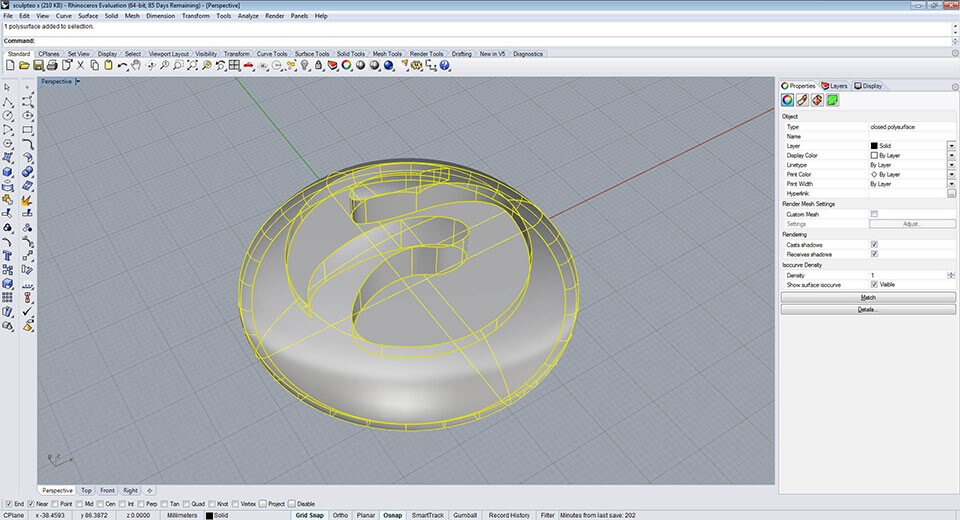
Figure 1. An interactive modeling interface in Rhinoceros. Image source: Sculpteo.
The greatest strength of this approach is that it aligns well with human intuition. A designer imagines a form and then shapes it step by step with their hands. The process feels natural. For sculptural forms and fast concept work, interactive modeling has an efficiency that is hard to replace.
But it also has a fundamental limitation: it records the result rather than the process. Once a designer finishes a model, revising an earlier decision, such as changing the curvature of a base curve or adjusting the proportion of a section, often means reworking everything downstream and sometimes starting over. The more complex the model becomes, the more expensive such revisions are.
In other words, interactive modeling produces a "frozen" geometric outcome. It captures the designer's intention at a specific moment, but once that intention has solidified into geometry, it becomes difficult to trace back and change. Some software, like Rhinoceros, offers construction history, but because that history is not presented in a clear and intuitive way, the logic often becomes tangled during real projects. Designers can easily forget how a complex model was built, especially after reopening it days later, and that makes revision more painful rather than less.
Node-Based Modeling: A Logic-Driven Generative Process
Node-based modeling offers a very different approach. It relies on a parametric design mindset in which the form is controlled through parameters. In Grasshopper, Houdini, or Dynamo for Autodesk Revit, the designer does not directly manipulate geometry. Instead, the designer connects functional nodes to build a generative logic. Each node represents an operation, such as creating a point, offsetting a curve, or performing a boolean operation. The wires carry data between nodes, and the final geometry is the output of the entire logic graph.
The defining characteristic here is that the designer does not define a single form, but a rule set for generating forms. Many values in that rule set can be exposed as parameters. Once they are exposed, the designer can adjust them at any time, and the model updates immediately.
Take a simple example. Suppose you want to design a parametric curtain wall facade. In an interactive workflow, you might manually draw each panel and adjust them one by one. In a node-based workflow, you define a logic such as "divide a surface by a certain rule, offset each cell, and chamfer the edges," then explore many variations by changing the parameters: grid density, offset distance, chamfer radius, and so on. Changing one parameter can generate a new design variant without rebuilding the model from scratch.
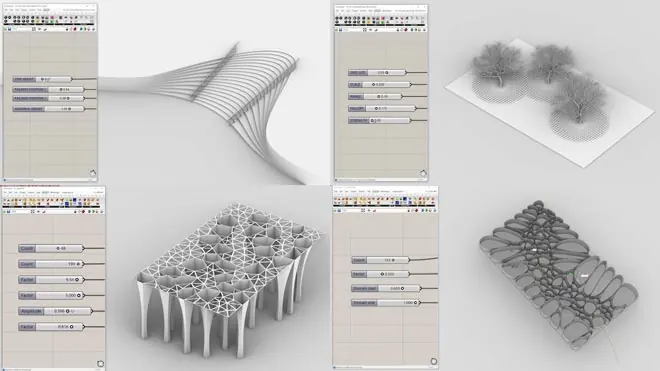
Figure 2. A parametric modeling interface in Grasshopper. Image source: howtorhino.com.
Parametric Design Is Powerful, but the Learning Curve Is Real
That power comes at a cost. Node-based modeling requires a substantial amount of computational thinking.
In interactive modeling, if a designer wants to chamfer an edge, they simply click the edge they see and enter a radius. The whole process is direct and intuitive. In node-based modeling, geometry is not "seen and selected"; it is "computed and referenced." The same chamfer operation becomes a logic problem: "from the list of faces on this Brep, select the upward-facing one." That is no longer a spatial action. It is a data-flow reasoning process.
This leap from spatial intuition to abstract logic is the root of the frustration many designers experience when learning parametric modeling. Parametric design is elegant, flexible, and reusable, but it asks designers to think more like programmers: in terms of data structures, type matching, and logical relationships. For designers who are strongest in visual and spatial perception, that is a high barrier.
The Essential Difference: From Interface Style to Computational Model
On the surface, interactive modeling and node-based modeling simply look like two different interfaces: one uses direct manipulation, the other uses nodes and wires. But from a computational point of view, the real difference is this:
Interactive modeling is about making one design. Node-based modeling is about defining a family of designs.
In interactive modeling, each step commits to a specific geometric result. You draw one curve, and that curve is exactly what it is. You extrude one profile, and the height is fixed. Each action narrows the design space until you arrive at one specific solution.
In node-based modeling, the designer defines a set of parametric generation rules. Those rules do not describe one specific design. They describe a design space. By changing the parameters, the designer can generate countless alternatives that all satisfy the same underlying logic. The designer's task shifts from "define one object" to "define a family of related objects."
That difference has several important practical consequences:
- Editability: Parametric models can be revised flexibly without throwing everything away. In real projects, designs almost never get approved in one pass, so this matters a lot.
- Explorability: Designers can generate and compare many options in a short time. In interactive modeling, producing even a few variations may take hours. In a well-structured parametric model, it may take a slider drag.
- Reusability: A well-defined node graph can be reused across projects. A facade logic, for example, can be applied to many different surfaces.
- Optimisability: Parametric models naturally connect to optimisation. Parameters can become design variables, and performance metrics such as structural behaviour, cost, or daylight can become objectives. That is fundamentally harder to do in an interactive workflow.
The Nature of Parametric Design: A Special Kind of Programming
At this point, we can ask a deeper question: what is parametric design at the computational level? Understanding this not only clarifies how it differs from traditional programming, but also explains why it is such a natural fit for AI.
Ordered Instructions Plus Parameters: The "Syntax" of CAD
When an engineer finishes a model in SolidWorks or Fusion 360, the software is not storing only the final geometry. It is also storing an ordered sequence of operations: sketch on a plane, extrude 10 mm, fillet an edge by 2 mm, mirror the result, perform a boolean operation, and so on. This is what CAD software calls the feature tree or construction history.
From a computer science perspective, that ordered sequence is essentially a program. Each step can be formalised as an instruction with parameters:
Sketch(plane=XY, profile=rectangle(20, 30))
Extrude(distance=10, direction=Z)
Fillet(edge=edge_3, radius=2)
Mirror(plane=YZ)
Boolean(operation=subtract, tool=cylinder(r=3, h=15))
This instruction-sequence-plus-parameters representation is exactly why AI research such as DeepCAD and Text2CAD can treat CAD modeling as a language-generation problem. If a CAD model can be expressed as a token sequence, then a Transformer can be trained to model it.
Node-Based Modeling: A Directed Acyclic Graph as a Program
In Grasshopper and similar environments, the situation is different. The nodes and wires form not a linear instruction list but a directed acyclic graph (DAG). Each node is a function. Each wire is a flow of data. The whole graph defines a computation pipeline from input parameters to output geometry.
That means a Grasshopper definition is essentially a data-flow program. Compared with a traditional imperative program, such as a Python script, it has one important difference: it has data flow but little visible control flow. There is no deeply nested if-else tree, no obvious loop stack, no recursive call structure exposed at the top level. Data moves across the graph from left to right, each node transforms its input, and the final geometry emerges from that pipeline.
Grasshopper does contain looping and conditional components, but those behaviours are encapsulated within nodes. At the macro level, the whole definition still behaves like a DAG rather than a control-flow tree.
Why Parametric Design Is More Learnable for AI than Interactive Design
Once that distinction is clear, we can return to the main question: why is AI more likely to learn parametric design than interactive modeling?
Parametric Design Can Be Represented as Code; Interactive Design Usually Cannot
This is the most fundamental difference. As discussed above, CAD instruction sequences and node graphs are both formal programs. They can be serialised into tokens. That makes them natural learning targets for AI: there is a clear input, such as a text description or design brief; a clear output, such as an operation sequence or node graph; and a potentially automatable evaluation process, such as executing the sequence and comparing the geometry.
Interactive modeling is very different. The path of the mouse, the decision to click one face rather than another, the constant visual checking and manual nudging all depend heavily on human spatial perception and visual feedback. You can record a designer's actions, but those actions are tightly bound to a specific software interface, which makes large-scale data collection difficult. Interactive modeling is also deeply entangled with visibility and recognition: when structures become complicated, precise operation becomes difficult even for humans.
The Vocabulary of Parametric Design Is Limited and Semantically Clear
The "code" of parametric design is effectively a domain-specific language. Its vocabulary is relatively small: sketch, extrude, fillet, array, boolean, and a few dozen other common operations. Its syntax is well structured. Many operations typically follow others in predictable ways, constrained by geometric validity. And the intent of each step is usually explicit.
DeepCAD already showed that a relatively simple Transformer, trained on 180,000 CAD construction sequences, could generate valid and topologically correct CAD models. That works precisely because the "language" of parametric design is narrow, structured, and rule-governed enough for AI to learn with a manageable amount of data.
Continuous Parameters Provide Some Tolerance
The choice of operation type and sequence is still discrete, and getting those wrong can absolutely break a model. But at the level of parameter values, the problem is often more forgiving. If an extrusion distance changes from 10 mm to 10.3 mm, the result is still likely to be a valid object. The shape may be slightly off, but it remains meaningful. That kind of numerical continuity provides some tolerance, which lowers the precision burden for AI.
Of course, that tolerance has limits. If a fillet radius exceeds the available edge length, the operation may fail outright. Still, the parameter dimension offers far more room for graceful error than a mouse-driven interactive workflow.
Why AI Still Has Not Learned Parametric Design Well
If parametric design is so suitable for AI in principle, why has progress remained limited in practice?
In my view, the answer comes down to data and perception.
Parametric Design Files Are Scarce
Parametric design demands computational thinking, which is exactly the barrier discussed earlier. Only a minority of designers can use Grasshopper, Dynamo, or CAD scripting fluently. That means the total volume of parametric design files is much smaller than the volume of interactive models.
Compared with the CAD sequences used in the ABC dataset for DeepCAD, publicly available high-quality node-based parametric definitions are extremely rare. In many cases they are core technical assets inside firms rather than things people share openly.
More importantly, the quality varies dramatically. The value of a parametric definition depends on how well it defines a design space. Are the parameter ranges meaningful? Are the constraints between parameters well formed? Do the resulting variants remain usable?
A good parametric definition can generate a family of robust design alternatives. A poor one may only function under one narrow set of parameter values, breaking as soon as something changes. Formally, both are valid parametric files. As training data, however, one teaches reusable logic and the other teaches brittle behaviour.
In other words, parametric design data is not only scarce; it also needs curation. Not every parametric file is worth learning from. Only those with a well-structured design space, strong parameterisation, and genuine reuse value make good training data. And automatically judging that quality is still an unsolved problem.
AI Still Lacks Real 3D Spatial Understanding
There is also a deeper challenge: current AI models do not truly understand three-dimensional space.
Parametric design can be formalised as operation sequences or node graphs, but when designers build those structures, they are guided by a mental model of the geometry in space. They know where an edge lies, which direction a face normal points, and how two solids relate spatially. That spatial reasoning guides the choice of operations and the setting of parameters.
Today's mainstream AI models, whether they process token sequences or graph structures, still learn mostly at the symbolic level. They can learn that Extrude is often followed by Fillet, but they do not really understand why a specific edge should be filleted or whether a parameter choice will cause self-intersection. Those judgments often depend on holistic geometric understanding.
That is why recent work such as Pointer-CAD has started using B-Rep geometry itself as a conditioning input, so the model can "see" the current geometric state at each generation step. In essence, that line of work is an attempt to compensate for AI's lack of native 3D perception.
Data and Perception Are the Two Remaining Barriers
This creates an interesting tension. Parametric design is, in form, the kind of design representation that AI should learn most naturally. But in practice it faces two major bottlenecks: scarce, uneven-quality data and limited spatial understanding in current models.
Few people can create strong parametric systems. Fewer still create excellent ones. And almost none of those are publicly shared at scale. At the same time, even if we had the data, today's models still lack the 3D intuition that human designers rely on when constructing parametric logic.
That may also explain why most current Text-to-CAD research remains focused on relatively simple "sketch plus extrusion" problems. It is not because researchers do not want to tackle richer forms of parametric generation. It is because the current boundary is set by both the available data and the current ability of models.